Providers
Our platform is provider-agnostic, meaning it is designed to function independently of any single service provider. Whether you’re using OpenAI's ChatGPT, Microsoft's services, or any other provider, the system remains operational and adaptable. Should a provider, like ChatGPT or Microsoft, cease operations, the platform can seamlessly switch to an alternative provider without causing significant disruption.
To view details about the current provider, simply click on its name or icon. In the same window you can update information about a provider.
Chat Model & Embedding Model
The Chat model is responsible for generating natural language responses and facilitating interactive conversations with users. The Embedding model, however, focuses on retrieving data and generating relevant chunks of information based on semantic similarity.
When you turn on the Knowledge toggle, the chosen Embedding model is used to process and embed the knowledge stored in the document management system. These smaller chunks of information are then used to search and retrieve relevant data. You cannot turn on the knowledge feature without first selecting an embedding model. This feature allows you to have a control over providers: for example, you might use OpenAI for chat, but want to create the chunks through Azure.
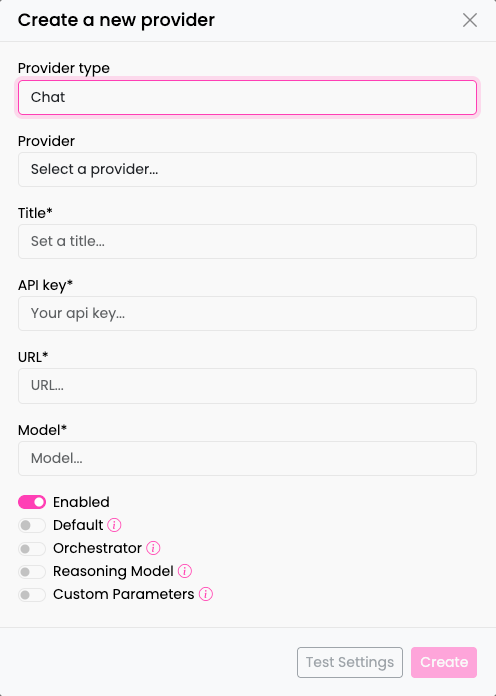
You are required to always provide information about the Chat Model. However, details about the Embedding Model are only necessary if you intend to work with knowledge-based tasks, such as creating RAG Nodes (Retrieval-Augmented Generation). The specific details you need to fill in for each field will depend on the chosen Provider Type and its associated Settings.
Update Provider
You can configure the following provider settings:
- Enabled: You can activate or deactivate the provider depending on your needs.
- Knowledge: Enable this provider to be used for knowledge-related functions. This may involve retrieving or managing information.
- Default: Set this provider as the default option. If no other provider is available or configured, this one will be used automatically for various tasks.
- Orchestrator: Use this provider as an orchestration model that will determine the selection of flows.
- Reasoning Model: Enable this for reasoning models.
- Custom Parameters: Custom parameters to be passed to LiteLLM.
After configuring the provider settings, click the Save button to apply and store your changes.
To remove a provider, click the Delete button. You will be prompted to confirm the deletion.
Create new Provider
To create a new provider, click Create Button in the upper-right corner. Fill the form with the following information: Provider Type, Title, API-Key, URL, Chat Model, Embedding Model. Confirm with Create.