Sources in Bot Responses
TL;DR: You can attach a list of markdown strings as
sourcesto bot utterances. In the chat client, these sources are shown behind a small source trigger and can be opened in a slide-up panel with one source card per entry.
The Sources feature lets bot developers attach structured references to a bot answer. This is useful when a response should show where information came from, provide further reading, or offer a short summary with external links.
Each source is provided as a markdown string. The chat client renders these entries in a dedicated sources UI below the answer flow, rather than mixing them directly into the response text.
What the Feature Does
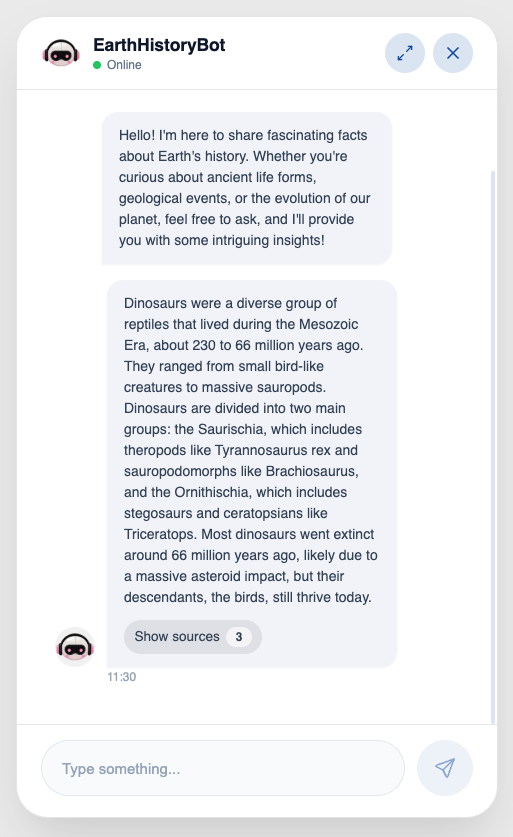
When a bot utterance contains sources, the chat client:
- shows a small source trigger after the bot response
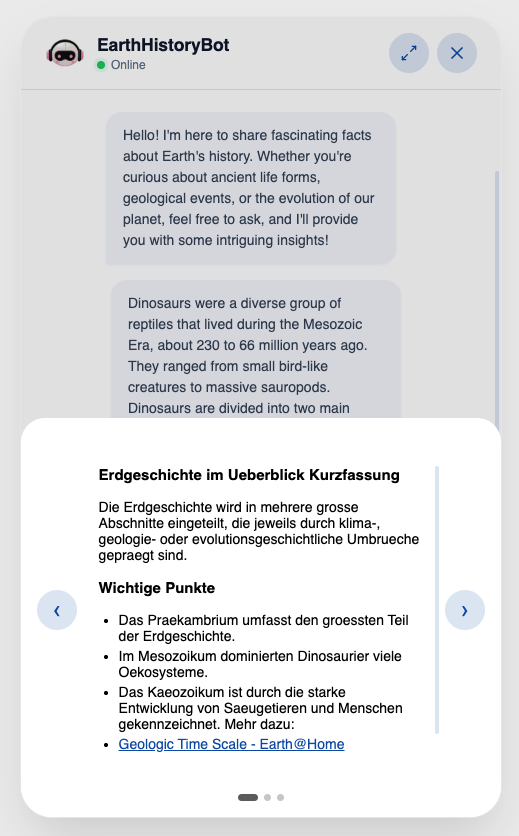
- opens a slide-up sources panel when the trigger is clicked
- renders one source entry per card
- lets the user navigate between multiple sources
- supports markdown formatting such as headings, lists, emphasis, and links
This makes it possible to keep the main answer concise while still exposing background material in a structured way.
Typical Use Cases
Use sources when you want to:
- cite knowledge-base or website content behind an answer
- provide a short summary plus a link to the full article
- separate multiple references into distinct cards
- attach "read more" material without cluttering the main response
Screenshots
How to Add Sources in Code
The sources parameter accepts a list of markdown strings:
sources = [
    "# Product docs\n\nShort summary of the source.\n\n[Open documentation](https://example.com/docs)",
    "# API reference\n\nUseful for implementation details.\n\n[Open API reference](https://example.com/api)",
]
Pass that list into one of the tracker API utter methods.
Basic Example
class action(Action):
    async def run(self, tracker_api: RemoteLLMTrackerApi):
        sources = [
            "# Help Center\n\nShort summary of the article.\n\n[Open article](https://example.com/help-center)",
            "# Pricing\n\nOverview of the available plans.\n\n[View pricing](https://example.com/pricing)",
        ]

        tracker_api.fixed_utter(
            "Here is a short answer with two references.",
            sources=sources,
        )
Using Sources with Different Utter Methods
fixed_utter()
Use this when you want full control over the bot text and the attached references.
tracker_api.fixed_utter(
    "Your subscription can be upgraded at any time.",
    sources=[
        "# Subscription plans\n\nCompare all available plans.\n\n[View plans](https://example.com/plans)",
        "# Billing FAQ\n\nAnswers to common billing questions.\n\n[Open FAQ](https://example.com/billing-faq)",
    ],
)
llm_utter()
Use this when the response text comes from an LLM call, but you still want to attach curated references.
messages = [
    {"role": "system", "content": "Answer briefly and clearly."},
    {"role": "user", "content": "How does data retention work?"},
]

response = await tracker_api.a_call_llm(messages)

await tracker_api.llm_utter(
    response,
    sources=[
        "# Data retention policy\n\nSummary of retention periods and deletion rules.\n\n[Open policy](https://example.com/retention)",
        "# Privacy overview\n\nHigh-level explanation of storage and deletion.\n\n[Read more](https://example.com/privacy)",
    ],
)
stream_utter()
Use this when the answer should stream to the user while still exposing references afterwards.
messages = [
    {"role": "system", "content": "Answer in a helpful tone."},
    {"role": "user", "content": "What does the onboarding process look like?"},
]

stream = await tracker_api.stream_call_llm(messages=messages)

await tracker_api.stream_utter(
    stream,
    sources=[
        "# Onboarding overview\n\nSummary of the first setup steps.\n\n[Open guide](https://example.com/onboarding)",
        "# Setup checklist\n\nChecklist for admins and editors.\n\n[Open checklist](https://example.com/checklist)",
    ],
)
stream_response_model()
Use this if you stream only one field of a structured response model to the user.
stream = await tracker_api.stream_call_llm(messages=messages)

await tracker_api.stream_response_model(
    stream,
    "answer",
    sources=[
        "# Structured output guide\n\nExplains the streamed field and how it is used.\n\n[Open guide](https://example.com/structured-output)",
    ],
)
a_stream_utter_and_extract_tool_call()
Use this when you want to stream a user-visible answer and also capture a tool call from the same model output. If the model makes multiple parallel tool calls, only the first one is returned — use a_stream_utter_and_extract_tool_calls() to receive all of them.
stream = await tracker_api.stream_call_llm(messages=messages)

await tracker_api.a_stream_utter_and_extract_tool_call(
    stream,
    sources=[
        "# Tool call example\n\nBackground information for the streamed response.\n\n[Read more](https://example.com/tool-calls)",
    ],
)
a_stream_utter_and_extract_tool_calls()
Use this when you want to stream a user-visible answer and also capture all tool calls from the same model output, including parallel tool calls. Returns a list of tool calls sorted by index, or an empty list if the model did not call any tool.
stream = await tracker_api.stream_call_llm(messages=messages)

tool_calls = await tracker_api.a_stream_utter_and_extract_tool_calls(
    stream,
    sources=[
        "# Tool call example\n\nBackground information for the streamed response.\n\n[Read more](https://example.com/tool-calls)",
    ],
)
Recommended Markdown Structure
For best results, keep each source entry short and scannable.
Recommended structure:
- A heading with the source title
- A short summary in one or two sentences
- One or more links for deeper reading
Example:
# Knowledge Base Article

Short explanation of what this source contains and why it is relevant.

## Highlights
- Important point one
- Important point two

[Open article](https://example.com/article)