Form Validation Script
TL;DR: Form Validation Scripts run after all individual field validators pass on a Form Node, enabling cross-field validation, value modification, and form rejection with LLM feedback. Use them to validate relationships between fields (e.g., end date > start date), transform values before saving, or reject entire forms with descriptive error messages that guide the LLM to retry.
A Form Validation Script is a custom Python script that executes at the form level after all individual extraction field validators have passed. Unlike field-level validation scripts that validate single values in isolation, form validation scripts can access all extracted values simultaneously, making them ideal for complex validation logic that spans multiple fields.
Why Use Form Validation Scripts?
Form validation scripts give you precise control over the final validation stage of form extraction. Instead of only validating fields individually, you can:
- Cross-field validation - Ensure relationships between multiple fields are valid (e.g., end date after start date, password confirmation matches password)
- Value transformation - Modify or enrich validated values before they're saved (e.g., calculate totals, standardize formats)
- Business rule enforcement - Apply complex business logic that requires multiple field values
- Form rejection - Reject the entire form with a descriptive error message that's fed back to the LLM for retry
- Dynamic validation - Use conversation history or external data to validate the form
When to Use Form Validation vs. Field Validation
Use Form Validation Scripts when:
- You need to validate relationships between multiple fields
- Validation logic depends on combinations of values
- You want to modify multiple fields based on other field values
- Business rules require evaluating the complete form data
Use Field Validation Scripts (on individual extraction fields) when:
- Validation is independent for each field
- Each field can be validated in isolation
- You want validation to run as soon as the LLM extracts that specific field
Best Practice: Start with field-level validation for simple checks, and add form-level validation only when you need cross-field logic. This keeps your validation modular and easier to maintain.
Creating a Form Validation Script
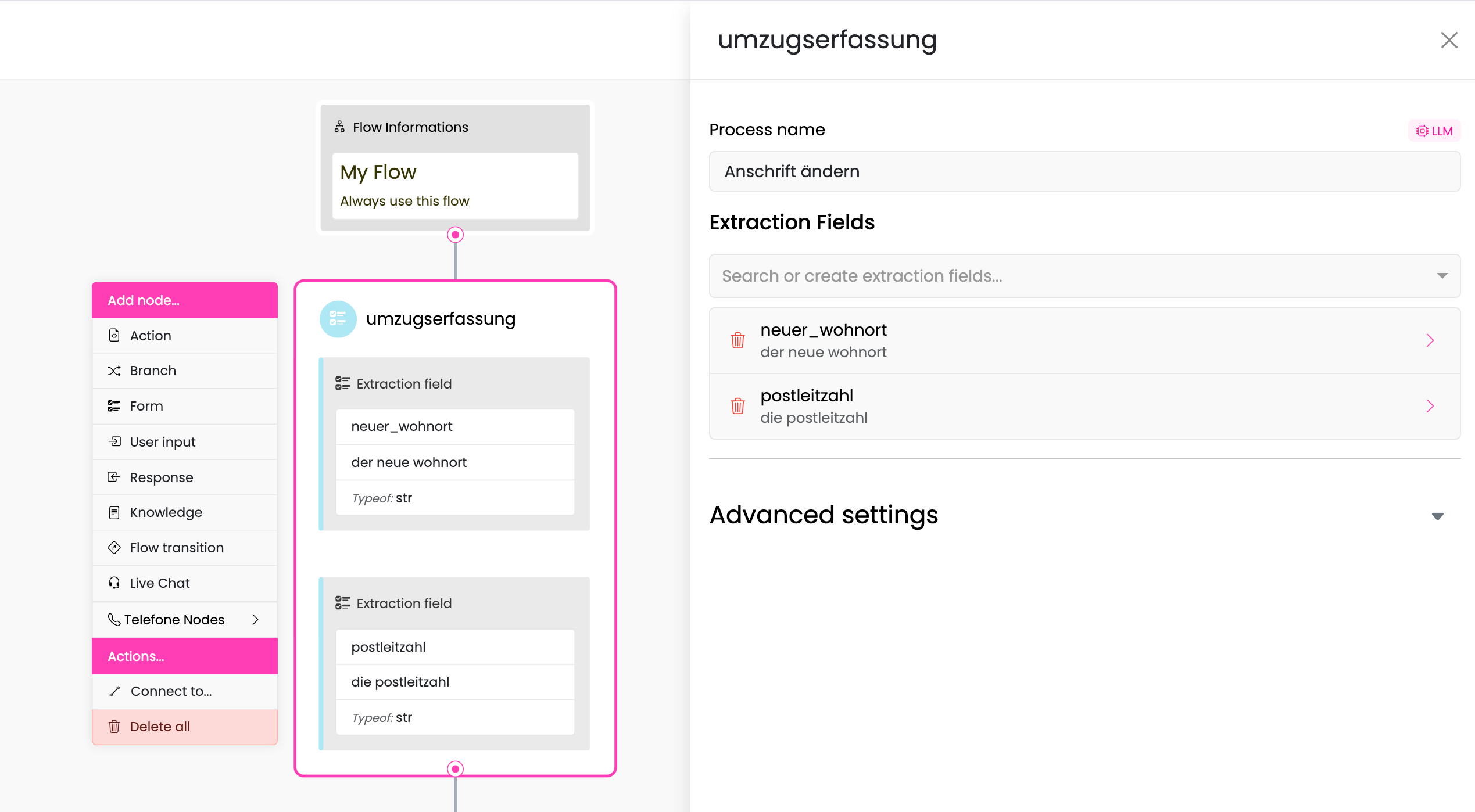
Step 1: Open Your Form Node
- Navigate to Content → Flows
- Open the flow containing your Form Node
- Click on the Form Node you want to add validation to
Step 2: Enable Form Validation
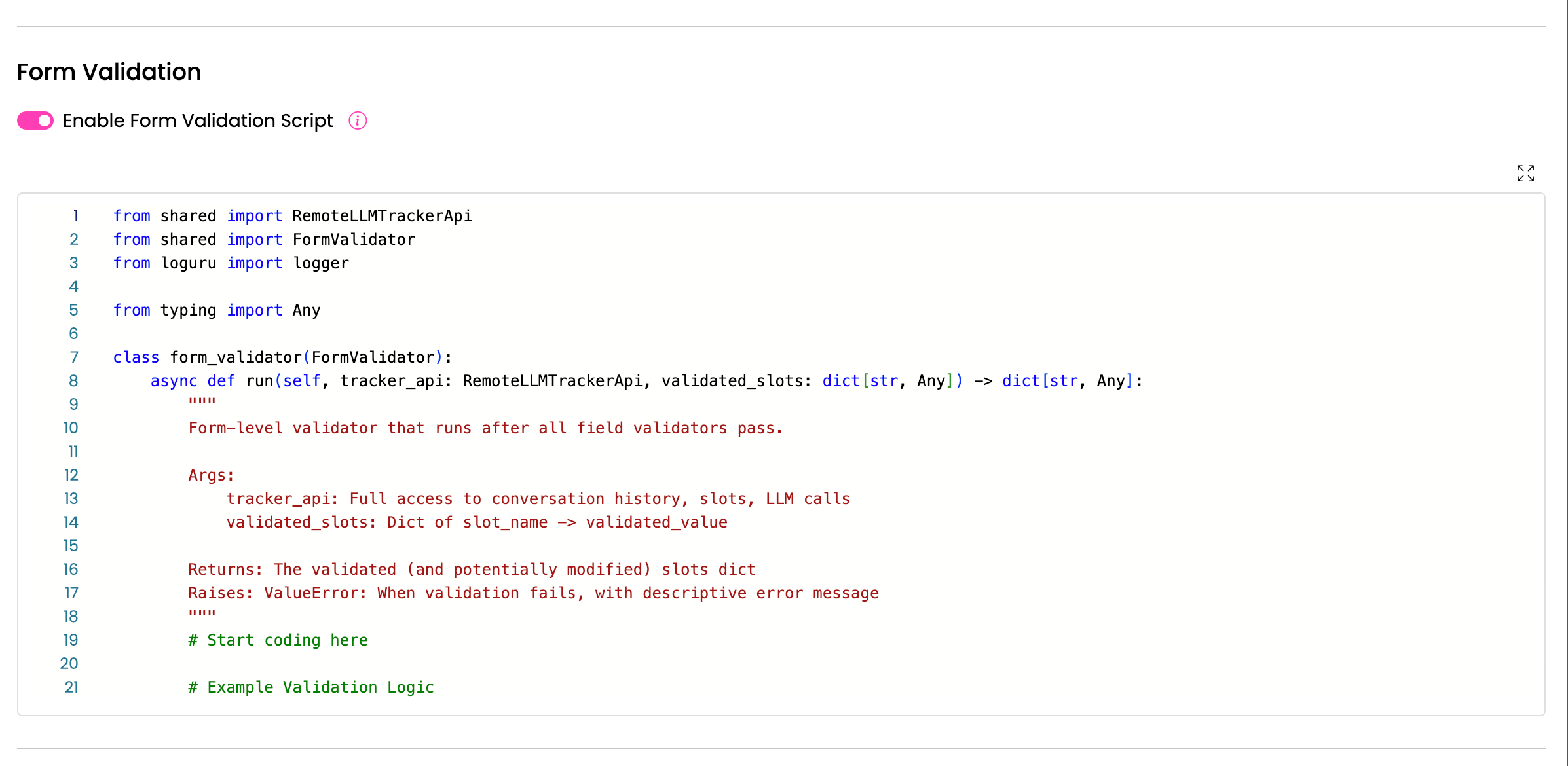
- Scroll down to the Form Validation Script section at the bottom of the Form Node editor
- Toggle the Form Validation Active switch to enable it
- The code editor will appear with a default template
Step 3: Write Your Validation Logic
The default template provides the basic structure:
from shared import RemoteLLMTrackerApi
from shared import FormValidator
from loguru import logger
from typing import Any

class form_validator(FormValidator):
    async def run(
        self,
        tracker_api: RemoteLLMTrackerApi,
        validated_slots: dict[str, Any]
    ) -> dict[str, Any]:
        """
        Form-level validator that runs after all field validators pass.

        Args:
            tracker_api: Full access to conversation history, slots, LLM calls
            validated_slots: Dict of slot_name -> validated_value

        Returns:
            The validated (and potentially modified) slots dict

        Raises:
            ValueError: When validation fails, with descriptive error message
        """
        # Start coding here

        # Example Validation Logic
        is_valid = True

        if not is_valid:
            # Default Form Agent gives this error to the LLM
            raise ValueError("Form validation failed")

        return validated_slots
Step 4: Save and Deploy
- Click Save to save your script as a draft
- Click Deploy to activate your validation script
- The script will now run every time this Form Node completes extraction
Note: Like other scripts, form validation scripts support draft mode and version management. See Scripts for details on managing script versions.
How Form Validation Works
Execution Flow
When a Form Node extracts data, the validation process follows this sequence:
1. User provides input
   ↓
2. LLM extracts field values (tool call)
   ↓
3. Pydantic type validation (automatic type conversion)
   ↓
4. Individual field validators run (if active)
   ↓
5. ✨ Form validation script runs (if active) ✨
   ↓
6. Values saved to slots OR form rejected with error
Success Scenario
When your form validator returns the validated_slots dict without raising an exception:
- All slots are saved with their (potentially modified) values
- The Form Node completes successfully
- A
FormValidationSuccessEventis emitted to the event buffer - The bot continues to the next node in the flow
Failure Scenario
When your form validator raises a ValueError:
- All slots for this form are reset to
None(except the special__form__slot) - The error message from the
ValueErroris sent back to the LLM - A
FormValidationErrorEventis emitted to the event buffer - The LLM receives the error as function call feedback and can retry with corrected values
Example error flow:
# Your validator raises an error
raise ValueError("End date must be after start date. Please provide valid dates.")

# LLM receives: "Failed to perform book_appointment with the following errors:
#   - __form__: End date must be after start date. Please provide valid dates."

# LLM responds to user: "I apologize, but the end date needs to be after
# the start date. Could you please provide a valid end date?"
Common Use Cases
1. Cross-Field Validation
Validate relationships between multiple fields:
async def run(self, tracker_api, validated_slots):
    # Date range validation
    if validated_slots['end_date'] < validated_slots['start_date']:
        raise ValueError(
            "The end date must be after the start date. "
            "Please provide valid dates."
        )

    # Password confirmation
    if validated_slots.get('password') != validated_slots.get('password_confirm'):
        raise ValueError(
            "The password and confirmation password do not match. "
            "Please try again."
        )

    # Quantity vs. availability
    if validated_slots['quantity'] > validated_slots['available_stock']:
        raise ValueError(
            f"Only {validated_slots['available_stock']} units are available. "
            f"Please reduce your quantity."
        )

    return validated_slots
2. Value Transformation
Modify values before saving:
async def run(self, tracker_api, validated_slots):
    # Calculate derived values
    num_days = (validated_slots['end_date'] - validated_slots['start_date']).days
    validated_slots['total_price'] = num_days * validated_slots['daily_rate']

    # Normalize text values
    validated_slots['email'] = validated_slots['email'].lower().strip()
    validated_slots['country_code'] = validated_slots['country_code'].upper()

    # Format phone numbers
    phone = validated_slots['phone_number'].replace('-', '').replace(' ', '')
    validated_slots['phone_number'] = f"+1-{phone[:3]}-{phone[3:6]}-{phone[6:]}"

    return validated_slots
3. Conditional Validation
Apply validation rules based on other field values:
async def run(self, tracker_api, validated_slots):
    # Country-specific validation
    if validated_slots['country'] == 'US':
        if not validated_slots.get('zip_code'):
            raise ValueError(
                "ZIP code is required for US addresses. "
                "Please provide your ZIP code."
            )
        if len(validated_slots['zip_code']) != 5:
            raise ValueError(
                "US ZIP codes must be 5 digits. "
                "Please provide a valid ZIP code."
            )

    # Age-based validation
    if validated_slots['age'] < 18:
        if not validated_slots.get('parent_consent'):
            raise ValueError(
                "Parental consent is required for users under 18. "
                "Please confirm parental consent."
            )

    return validated_slots
4. External API Validation
Call external services to validate form data:
async def run(self, tracker_api, validated_slots):
    import aiohttp

    # Check if email is already registered
    email = validated_slots['email']
    async with aiohttp.ClientSession() as session:
        async with session.get(
            f"https://api.example.com/check-email?email={email}"
        ) as response:
            if response.status == 200:
                data = await response.json()
                if data['exists']:
                    raise ValueError(
                        f"The email {email} is already registered. "
                        "Please use a different email or log in."
                    )

    # Validate address with geocoding API
    address = validated_slots['address']
    # ... validation logic

    return validated_slots
5. Complex Business Rules
Implement sophisticated business logic:
async def run(self, tracker_api, validated_slots):
    # Pricing tier calculation
    quantity = validated_slots['quantity']
    base_price = validated_slots['unit_price']

    if quantity >= 100:
        discount = 0.20  # 20% discount
    elif quantity >= 50:
        discount = 0.10  # 10% discount
    elif quantity >= 10:
        discount = 0.05  # 5% discount
    else:
        discount = 0

    validated_slots['discount_percent'] = discount * 100
    validated_slots['total_price'] = quantity * base_price * (1 - discount)

    # Validate credit limit
    customer_credit_limit = tracker_api.get_slot("customer_credit_limit")
    if customer_credit_limit:
        if validated_slots['total_price'] > customer_credit_limit:
            raise ValueError(
                f"Your order total (${validated_slots['total_price']:.2f}) "
                f"exceeds your credit limit (${customer_credit_limit:.2f}). "
                "Please reduce your order quantity or contact sales."
            )

    return validated_slots
Best Practices
1. Keep Validation Logic Simple and Focused
Your form validator should be reliable and easy to understand:
Good:
# Clear, single-purpose checks
if validated_slots['end_date'] < validated_slots['start_date']:
    raise ValueError("End date must be after start date")

if validated_slots['age'] < 18:
    raise ValueError("You must be 18 or older to register")
Avoid:
# Overly complex nested logic
if (validated_slots['field1'] and
    (validated_slots['field2'] or validated_slots['field3']) and
    not validated_slots.get('field4', None) and
    some_complex_calculation(validated_slots) > threshold):
    # Hard to understand and maintain
2. Write Clear Error Messages
Error messages are fed back to the LLM, which uses them to guide the user. Make them conversational and specific:
Good:
raise ValueError(
    "The end date (June 15) must be after the start date (June 20). "
    "Please provide a valid end date that comes after June 20."
)
Avoid:
raise ValueError("Invalid date range")  # Too vague
raise ValueError("end_date <= start_date")  # Too technical
3. Handle Missing Optional Fields
Always check if optional fields exist before validating them:
# Safe - checks if field exists
if validated_slots.get('optional_field'):
    # Validate the optional field
    pass

# Unsafe - will raise KeyError if field doesn't exist
if validated_slots['optional_field']:  # ❌ Don't do this
    pass
4. Log Important Validation Events
Use logging to help debug validation issues:
from loguru import logger

async def run(self, tracker_api, validated_slots):
    logger.info(f"Form validation started with {len(validated_slots)} fields")

    try:
        # Validation logic
        if some_condition:
            logger.warning("Validation failed: condition X not met")
            raise ValueError("...")

        logger.info("Form validation successful")
        return validated_slots
    except Exception as e:
        logger.error(f"Form validation error: {e}")
        raise
5. Minimize External API Calls
External API calls add latency and potential failure points. Use them sparingly:
Consider:
- Can the validation be done with local data?
- Is the API call necessary for every form submission?
- What happens if the API is slow or unavailable?
If you must use APIs:
# Set timeouts
async with aiohttp.ClientSession(timeout=aiohttp.ClientTimeout(total=5)) as session:
    try:
        async with session.get(url) as response:
            # Handle response
            pass
    except asyncio.TimeoutError:
        logger.warning("API timeout, proceeding without validation")
        # Decide: fail validation or continue?
6. Don't Modify Slots Directly via tracker_api
While you have access to tracker_api.set_slot(), avoid using it in form validators. Instead, modify the validated_slots dict:
Good:
# Modify the returned dict
validated_slots['calculated_field'] = some_value
return validated_slots
Avoid:
# Don't set slots directly in validator
tracker_api.set_slot('calculated_field', some_value)  # ❌
Why? The form agent manages slot assignment. Modifying slots directly can lead to inconsistent state.
7. Test Edge Cases
Consider and test scenarios like:
- All fields at minimum values
- All fields at maximum values
- Boundary conditions (e.g., exactly equal dates)
- Empty optional fields
- Special characters in text fields
- Very large or very small numbers
8. Use Type Hints
Type hints improve code readability and catch errors:
from typing import Any
from datetime import datetime

async def run(
    self,
    tracker_api: RemoteLLMTrackerApi,
    validated_slots: dict[str, Any]
) -> dict[str, Any]:
    start_date: datetime = validated_slots['start_date']
    end_date: datetime = validated_slots['end_date']

    # Your validation logic with clear types
    return validated_slots
Error Types and Handling
ValueError - Validation Failed
Use ValueError when validation fails due to business logic:
if condition_not_met:
    raise ValueError("Descriptive message for the LLM")
Result:
- All form slots reset to
None - Error message sent to LLM
FormValidationErrorEventemitted- LLM can retry with corrected values
Other Exceptions - Execution Failure
Any other exception type indicates a script error:
# Unhandled exception
result = some_api_call()  # Raises ConnectionError
Result:
- All form slots reset to
None - Generic error message sent
FormValidationErrorEventemitted with execution failure status- Error logged for debugging
Best Practice: Catch and handle expected exceptions, converting them to
ValueErrorwith user-friendly messages:
try:
    result = await external_api_call()
except aiohttp.ClientError as e:
    logger.error(f"API call failed: {e}")
    raise ValueError(
        "Unable to verify your information at this time. "
        "Please try again in a moment."
    )
Monitoring and Debugging
Events
The system emits events you can monitor:
Success Event:
FormValidationSuccessEvent(
    payload=FormValidationSuccessPayload(
        form_name="book_appointment",
        validated_slots={
            "start_date": "2024-06-01",
            "end_date": "2024-06-15",
            # ... other slots
        }
    )
)
Error Event:
FormValidationErrorEvent(
    payload=FormValidationErrorPayload(
        form_name="book_appointment",
        validation_status=ValidationFailureStatus(
            message="End date must be after start date",
            value={...}  # The attempted slot values
        ),
        failed_slots={
            "start_date": "Error while validating the form",
            "end_date": "Error while validating the form",
            "__form__": "End date must be after start date"
        }
    )
)
Debugging Tips
- Use Logs: Add
logger.info()statements to trace execution - Check Event: Monitor events in the history
- Test in Development Chat: Use the development chat to test edge cases
- Review Error Messages: Check if error messages are clear and actionable
- Validate Script Syntax: Ensure your Python code has no syntax errors before deploying
Related Features
Field-Level Validation
For field-specific validation, use Validation Scripts on individual extraction fields:
# On the extraction field itself
if "@example.com" not in value:
    raise ValueError("Email must be from example.com domain")
See Extraction Fields for details.
Error Flows
If form validation fails repeatedly, consider triggering an Error Flow to gracefully handle the situation:
# In an action node after multiple failed attempts
failed_attempts = tracker_api.get_slot("form_failed_attempts") or 0
if failed_attempts > 3:
    # Trigger error flow or escalate to human
    tracker_api.set_slot("escalate_to_human", True)
Frequently Asked Questions
Q: What happens if my validator crashes?
If your validator raises an unexpected exception (not ValueError), the system treats it as an execution failure:
- All slots are reset to
None - A generic error message is sent
- The error is logged for debugging
- The form extraction can retry
Q: Can I call the LLM from inside the validator?
Yes, you have access to the full tracker_api, including LLM calls:
response = await tracker_api.a_call_llm(messages=[...])
However, use this sparingly as it adds latency and complexity.
Q: How do I test my form validator?
Use the Development Chat (see Development Chat):
- Test with valid inputs to ensure success
- Test with invalid inputs to trigger validation errors
- Verify error messages are clear and helpful
- Check that modified values are saved correctly
Q: Can I disable form validation temporarily?
Yes, toggle the Form Validation Active switch in the Form Node editor. This allows you to disable validation without deleting your script.
Q: What's the difference between form validation and field validation?
| Feature | Field Validation | Form Validation |
|---|---|---|
| Scope | Single field | All fields |
| When | After each field extraction | After all fields extracted |
| Access | Only current field value | All field values |
| Use For | Independent field checks | Cross-field relationships |
Q: Can I access conversation history?
Yes, use tracker_api.get_history() to access the full conversation:
history = tracker_api.get_history()
user_messages = [turn.content for turn in history if turn.role == 'user']
Related Documentation
- Extraction Fields - Learn about creating and managing extraction fields
- Form Node - Understand how Form Nodes work
- Scripts - General script management and best practices
- Error Flow - Handle validation failures with error flows
- Development Chat - Test your form validation scripts
Need Help?
If you encounter issues with form validation:
- Check the logs for error messages and stack traces
- Verify your script has no syntax errors
- Test with simple validation logic first, then add complexity
- Review the Best Practices section