Phone Events
Phone events are triggers that activate specific flows during a phone call. Configure these in the Events tab of the Phone Channel settings.
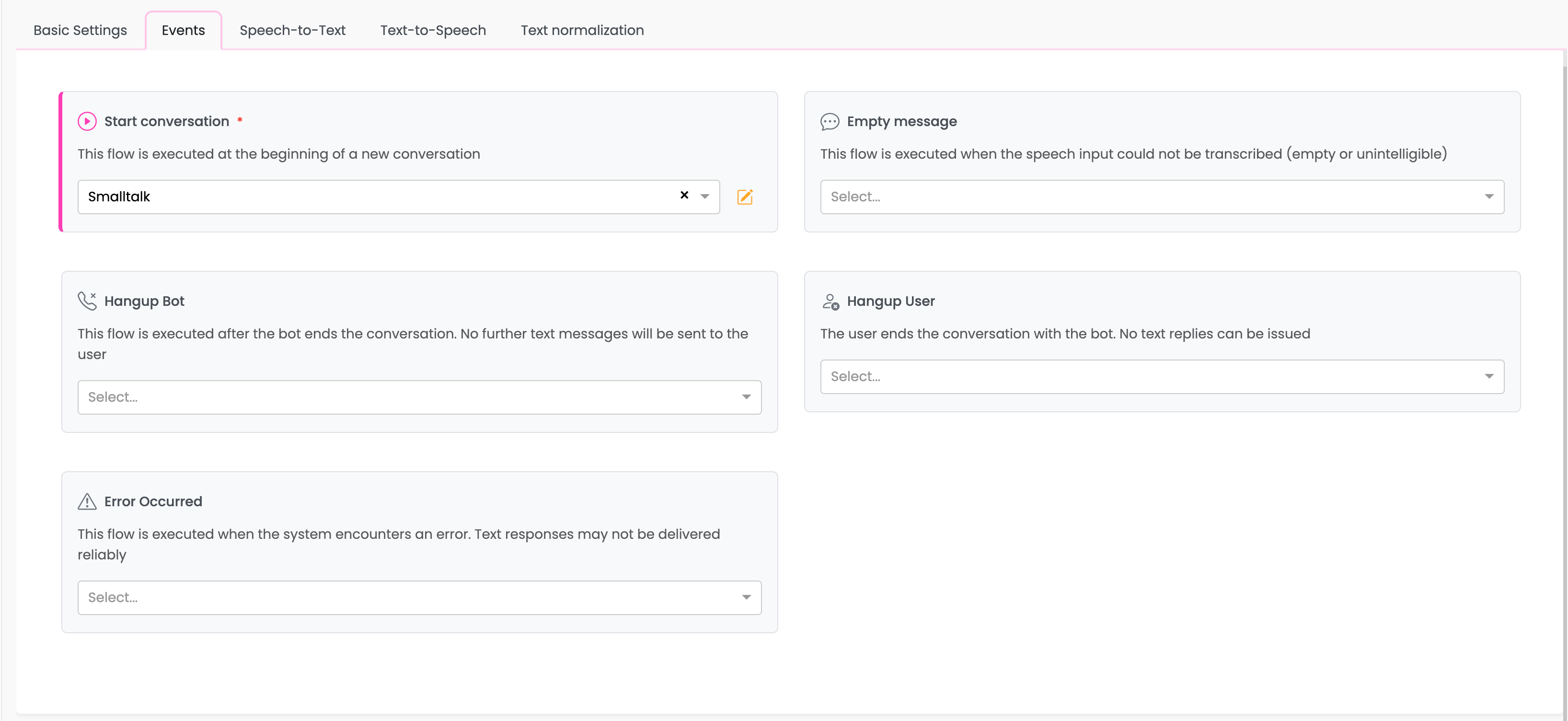
Event Types
Start Conversation (Required)
Signal: signalconversationstart
This flow is executed at the beginning of every new phone call. It is the entry point for your phone bot and is required when the phone channel is enabled.
Use cases:
- Greet the caller
- Identify the caller (via caller ID or verification)
- Route to appropriate department or flow
- Set initial conversation context
Example flow:
→ Response Node: "Welcome to Company Support. How can I help you today?"
→ User Input Node
→ Continue conversation...
Empty Message
Signal: signalemptymessage
This flow is executed when the speech input could not be transcribed (empty or unintelligible audio).
When it triggers:
- User remains silent during their turn
- Background noise without recognizable speech
- Very quiet or unclear audio
Use cases:
- Prompt the user to speak again
- Offer alternative input methods
- Handle silence gracefully
Example flow:
→ Response Node: "I'm sorry, I didn't catch that. Could you please repeat?"
→ User Input Node
Tip: Consider limiting how many times you loop back to this flow to avoid infinite loops if there's a persistent audio issue.
Hangup Bot
Signal: signalhangup
This flow is executed after the bot ends the conversation. At this point, no further text messages can be sent to the user.
When it triggers:
- Bot calls
tracker_api.hangup() - Conversation reaches a natural end
- Max turns limit exceeded
Use cases:
- Log call completion
- Save conversation summary
- Trigger post-call workflows (emails, tickets, etc.)
- Update CRM or database
Important: Since the call has ended, any utter or response nodes in this flow will not be spoken to the user. Use this flow only for backend processing.
Hangup User
Signal: signalhangupuser
This flow is executed when the user ends the call (hangs up). No text replies can be issued since the caller is gone.
When it triggers:
- User hangs up the phone
- Call is disconnected from user's side
Use cases:
- Log unexpected disconnections
- Save partial conversation data
- Mark conversation as incomplete
- Trigger follow-up actions
Important: Like Hangup Bot, responses in this flow are not delivered. Use for data processing only.
Error Occurred
Signal: signaloutoforder
This flow is executed when the system encounters an error. Text responses may not be delivered reliably.
When it triggers:
- System error during conversation
- Provider failure
- Unexpected exceptions
Use cases:
- Log error details
- Attempt graceful recovery
- Notify administrators
- Save conversation state for recovery
Note: Due to the error state, responses in this flow may or may not reach the user. Design the flow to handle worst-case scenarios.
Configuring Event Flows
Assigning a Flow
- Click the dropdown for the event you want to configure
- Select an existing flow from the list
- Click Save to apply changes
Creating a New Flow
If you need a new flow for an event:
- Click the dropdown
- Select Create New Flow at the bottom of the list
- Enter a name and description for the flow
- The new flow will be created and assigned
- Navigate to the flow editor to build your flow logic
Navigating to an Assigned Flow
Click the edit icon (pencil) next to a selected flow to navigate directly to the flow editor.
Best Practices
Start Conversation Flow
- Keep the greeting concise for phone interactions
- Consider identifying repeat callers via caller ID
- Set context slots early in the conversation
- Handle different call scenarios (business hours, after hours, etc.)
Empty Message Handling
- Limit retry attempts (e.g., max 3 retries)
- Offer to transfer to a human agent after multiple failures
- Consider the possibility of intentional silence
Hangup Flows
- Keep processing minimal and fast
- Don't attempt user interaction
- Handle errors gracefully (the user is gone)
- Log important metrics for analytics
Error Flow
- Log comprehensive error details
- Attempt to save conversation state
- Consider automatic escalation to human support
- Design for the case where the error flow itself might fail
Related Documentation
- Basic Settings - General phone configuration
- Phone API Reference - Programmatic event control
- Flows - Creating and editing flows